Invisible Item Frame Resource Pack (26.3, 1.20.1): Seamless Decoration & Clean Display Guide
Looking to display weapons, tools, armor, and food seamlessly on walls or tables without bulky wooden frames showing? Invisible Item Frame Resource Pack for Minecraft 1.20.1 (v26.3) is a popular utility texture pack designed to make standard item frame borders completely invisible, allowing displayed items to float naturally against blocks.
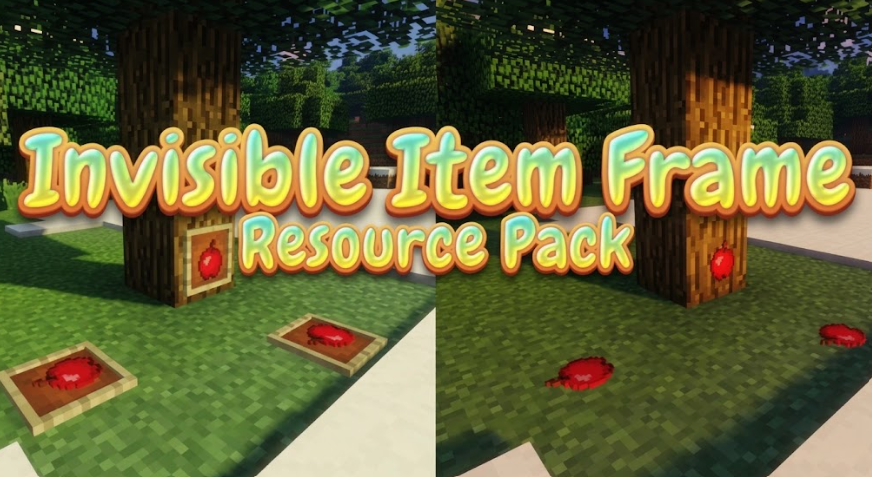
Whether you are designing modern interior builds, decorating realistic survival bases, or setting up clean chest organization systems, Invisible Item Frame (26.3, 1.20.1) provides a sleek, aesthetic upgrade without using commands or modded plugins.
Key Features of Invisible Item Frame Resource Pack (26.3, 1.20.1)
1. Seamless Clean Displays
-
Completely Transparent Borders: Hides default birch wooden frames and leather backgrounds, leaving only your placed item visible.
-
Glow Frame Support: Fully compatible with Glow Item Frames to showcase glowing items seamlessly in dark rooms or night builds.
2. Vanilla Survival Friendly
-
No Commands Required: Works instantly in Survival or Creative mode without needing complex
/givecommands or server plugins. -
Pure Client-Side Utility: Rendered directly through your resource pack folder, making it safe for singleplayer worlds and multiplayer servers.
3. Lightweight Performance & Modpack Synergy
-
Zero Lag Overhead: Ultra-lightweight file size that maintains maximum FPS during heavy base decorating.
-
Universal Compatibility: Works smoothly alongside popular shader packs, OptiFine, Sodium, and custom UI mods on Minecraft 1.20.1.
How to Install Invisible Item Frame Resource Pack (26.3, 1.20.1)
-
Download Resource Pack: Grab the official
Invisible_Item_Frame_v26.3_1.20.1.ziparchive. -
Open Resource Packs Folder: Launch Minecraft, go to Options > Resource Packs, and click Open Pack Folder.
-
Move Files: Drag and drop the downloaded
.zipfile into theresourcepacksdirectory. -
Activate & Enjoy: Move the pack to the right-hand active column in-game, click Done, and place your items on walls!
Why Download Invisible Item Frame Resource Pack for Minecraft?
If you want clean, professional-looking interior builds and floating item displays without complex commands on version 1.20.1, Invisible Item Frame Resource Pack (26.3) is a must-have utility tool.