Looking for the Cloth Config API Mod for Minecraft 26.2 and 1.21.11? Cloth Config API is a popular Minecraft library mod that helps developers create configuration screens for their mods. If you enjoy customizing Minecraft with mods, this API can make it easier to access settings, adjust gameplay options, and personalize your gaming experience.
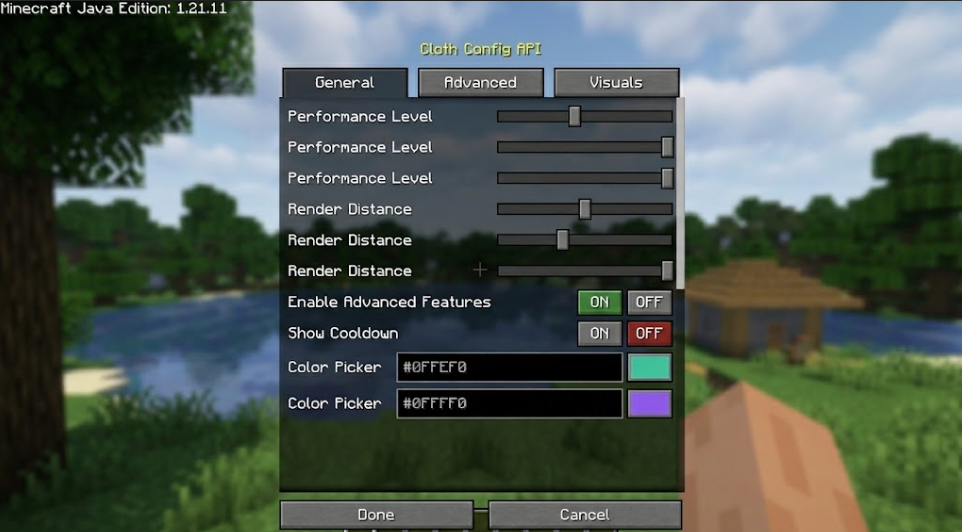
In this guide, you will learn what Cloth Config API does, how it works, why other Minecraft mods may require it, and what to check before downloading and installing it.
What Is Cloth Config API Mod?
Cloth Config API Mod is a configuration library designed to help Minecraft mod developers build user-friendly configuration menus. Instead of requiring players to manually edit configuration files, compatible mods can use Cloth Config API to provide an accessible graphical interface.
For example, a Minecraft mod might allow you to change gameplay settings, adjust visual effects, enable or disable features, or customize other options. When the mod supports Cloth Config API, these settings can be presented through a configuration screen rather than requiring you to search through text files.
Cloth Config API is primarily a utility for mod developers and players who use mods that depend on it. It does not usually add new blocks, mobs, weapons, dimensions, or biomes to Minecraft by itself.
Cloth Config API Mod Features
Here are some of the main reasons Minecraft players and mod developers use Cloth Config API:
- Configuration Screens: Provides tools for creating graphical settings menus for compatible Minecraft mods.
- Easy Mod Customization: Makes it easier to access supported settings without manually editing configuration files.
- Developer-Friendly Library: Offers a framework that mod creators can use to build configuration interfaces.
- Mod Compatibility: Serves as a dependency for mods that specifically require Cloth Config API.
- Improved User Experience: Helps make mod settings easier to understand and navigate.
- Flexible Configuration Options: Allows compatible mods to present different types of settings through their configuration interfaces.
The available options depend on the individual mod using the API. Installing Cloth Config API alone will not automatically add configuration menus for every mod in your Minecraft installation.
Cloth Config API Mod for Minecraft 26.2 and 1.21.11
If you are searching for Cloth Config API 26.2 or Cloth Config API 1.21.11, make sure you select a release that supports your exact Minecraft version.
Minecraft mods and library files can be version-specific. A file designed for one Minecraft release may not work correctly with another. You should also verify the supported mod loader, such as Fabric, NeoForge, or Forge, because compatibility varies by release.
Before downloading, check the official project page for the latest available version, supported Minecraft releases, loader requirements, and installation instructions. Do not assume that a file supports Minecraft 26.2 or 1.21.11 unless the release information confirms it.
How to Install Cloth Config API Mod
Follow these general steps to install Cloth Config API:
- Check Your Minecraft Version: Confirm whether you are playing Minecraft 26.2 or Minecraft 1.21.11.
- Choose the Correct Mod Loader: Verify whether your installation uses Fabric, Forge, or NeoForge and select a compatible file.
- Download the Compatible File: Obtain Cloth Config API from its official project page or a trusted source.
- Install the Required Loader: Make sure the correct mod loader is installed and working.
- Open the Mods Folder: Locate your Minecraft installation’s
modsfolder. - Add the Mod File: Place the downloaded
.jarfile inside the folder without extracting it. - Check Dependencies: Install any additional libraries required by your other mods.
- Launch Minecraft: Start the game using the matching profile and check for compatibility errors.
If Minecraft crashes during startup, verify the game version, mod loader, and dependency requirements before trying again.
Why Do Minecraft Mods Require Cloth Config API?
Many Minecraft mods use external libraries to avoid building every feature from scratch. Cloth Config API provides tools for configuration interfaces, allowing developers to focus on their mods’ main features.
If a mod reports a missing Cloth Config API dependency, installing the correct compatible release may resolve the problem. However, the API will not fix unrelated crashes or incompatibilities caused by other mods.
Features:
- Items bounce with a smooth hopping movement whenever they fall to the floor.
- Keeps the classic vanilla look without complicated ragdoll effects.
- Works on dropped blocks, tools, weapons, and food items.
- Offers settings to adjust the look and feel of every bounce.
How to Use and Install the Mod
- Check Mod Compatibility: Make sure the mod supports your Minecraft version and the mod loader you are using.
- Download the Mod: Get the correct mod file from the official project page or a trusted download source.
- Install Required Dependencies: Check whether the mod requires additional libraries, APIs, or other mods before launching the game.
- Install and Launch Minecraft: Follow the installation instructions, place the mod file in the appropriate
modsfolder if required, and start Minecraft using the compatible mod loader. - Explore the Mod Features: Enter your world and follow any in-game instructions to discover new items, mobs, blocks, mechanics, or other features added by the mod.
Tip: Always use a mod file that matches your Minecraft version and mod loader. Check the creator’s instructions for any special installation steps or compatibility requirements.