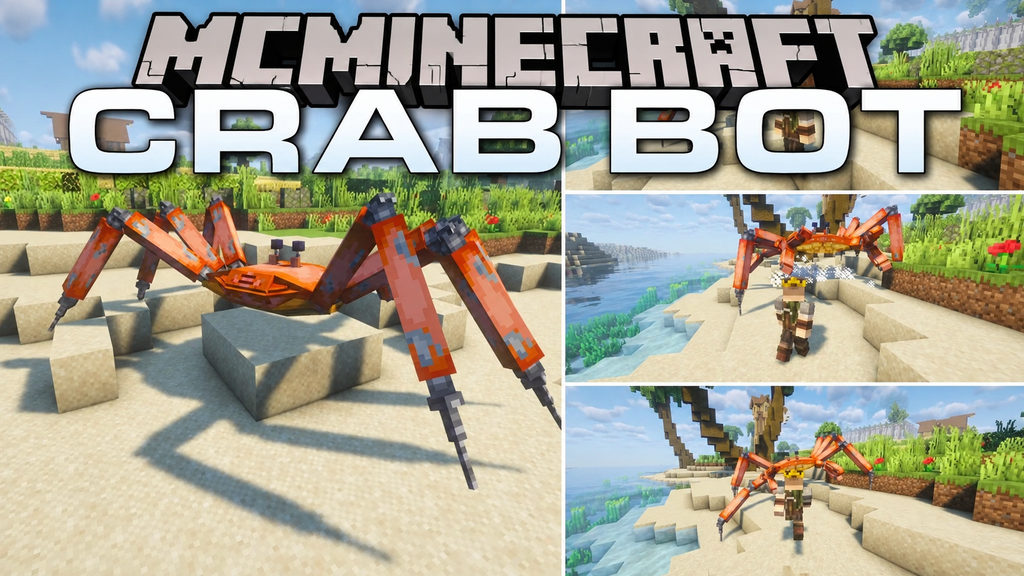
The Crab Bot Mod for Minecraft introduces a massive mechanical crab boss that lies hidden beneath the sandy beaches of your Minecraft world. Get too close to its underground hiding spot, and this powerful machine bursts out of the sand to challenge you to an intense battle. With its mechanical legs adapting to the terrain, the Crab Bot can pursue players along the shoreline, making every encounter more exciting. Defeat this formidable boss to earn a unique mechanical tool that lets you pull mobs toward you, adding a fun new mechanic to your Minecraft adventures.
Crab Bot Mod Features
- Adaptive Mechanical Legs: The giant crab robot adjusts its footing to navigate uneven terrain and move across sandy beaches.
- Underground Beach Burrows: Discover hidden Crab Bot encounters beneath beach sand, where the mechanical boss waits to emerge.
- Rocket-Powered Claw: Use a special claw weapon to hook nearby mobs and pull them toward you.
- Homing Missile Attacks: Stay alert as the Crab Bot launches tracking missiles that follow your movements during combat.
- Drill Shockwaves: Watch out for powerful ground attacks as the boss drives its spinning claws into the terrain, releasing damaging shockwaves.
- Baby Crab Robots: The mechanical boss deploys egg-shaped pods that open and release smaller crab robots during battle.
- Long-Range Target Pulling: The rocket-assisted claw can grab distant targets and drag them into the boss’s attack range.
- Powerful Ground Slams: Dodge heavy impacts and close-range claw strikes as the Crab Bot attacks players who get too close.
How to Use and Install the Mod
- Check Mod Compatibility: Make sure the mod supports your Minecraft version and the mod loader you are using.
- Download the Mod: Get the correct mod file from the official project page or a trusted download source.
- Install Required Dependencies: Check whether the mod requires additional libraries, APIs, or other mods before launching the game.
- Install and Launch Minecraft: Follow the installation instructions, place the mod file in the appropriate
modsfolder if required, and start Minecraft using the compatible mod loader. - Explore the Mod Features: Enter your world and follow any in-game instructions to discover new items, mobs, blocks, mechanics, or other features added by the mod.
Tip: Always use a mod file that matches your Minecraft version and mod loader. Check the creator’s instructions for any special installation steps or compatibility requirements.
Crab Bot Mod Download Links
For Minecraft1.21.11
NeoForge
Fabric